Back-to-School Apps for the Organized Student
By KIT EATON and DALLAS JENSEN on Publish Date August 26, 2015.
Students enjoying their last days of summer break have the threat of back-to-school time hanging over their heads, like the sword of Damocles. If that Damocles reference has you confused, why not look up the ancient story using the Google app? Then continue reading this column to discover other apps that can help students with their studies and make the back-to-school transition smoother.
Among the apps worth considering is gFlash+, which takes flashcards to a whole new level. You can create digital cards and write facts that you need to remember on them (“e to the power of i times pi is negative 1,” or some such). Use those cards to quiz yourself.
You can embed photos, audio files or videos, or all three, into flashcards to make them more visual and interactive. Users can share their flashcard sets with others through email, so a whole study group could benefit.
The core app, which allows users to create unlimited card sets, is free on iOS and Android. The pro version, which costs $4, gets rid of ads and includes organizing features and more. You can also pay to get access to card sets from third-party publishers, including big names in education like McGraw-Hill.
StudyBlue is an alternative flashcard app with many of the same features, including quizzes and card sharing, but a cleaner, more minimalistic look. Users can see millions of flashcards created and shared by other students and teachers.
To use most of the app’s features, StudyBlue users need to create a free account on iOS and Android. Upgrading to the pro edition gives users access to extras like the ability to customize the formatof your flashcards. StudyBlue’s pro level is somewhat pricey at $18 a month or $80 a year.
Note-taking is a vital part of student life, which is one reason to check out the Notability app. Notability, $6 for iPhones and iPads, lets users sketch on their screens, take handwritten notes or type notes. Typed notes don’t have to be in a linear document style — text boxes can be added anywhere on the page. Students can also annotate source material that is in PDF form directly from the app. And the app lets users make audio recordings of lectures or discussions so they can review a lesson later.
Notability also remembers the order in which you made your sketches and notes, and shows them at the appropriate points when you play the audio back. The app integrates with cloud services like Dropbox and iCloud and social media platforms like Twitter, making it easier to share notes with classmates.
On Android, Papyrus is a great alternative to Notability, providing many of the same functions. Users can take handwritten notes, make sketches using drawing tools, type in text and annotate images.
But while Papyrus is Notability’s equal in looks and ease if use, it lacks audio recording capabilities. To annotate PDFs, you will have to pay for an upgrade. Paid extras such as this cost $2 or more.
For students needing a good graphing calculator, the Quick Graph calculator app, free on iOS, is a popular choice. Its range of features include 3-D equation plotting, and its gesture-based interface is easy to control. An upgrade for more features costs $2.
Graphing Calculator by Mathlab is similar app and free on Android, and it has even more features, including a full scientific calculator mode. Its complexity, however, with many layers of options and menus, can get confusing.
Keeping track of class times, assignment details and test dates can be tiresome. But myHomework Student Planner , free on iOS and Android, can help keep a schedule organized. Its best features are a clean appearance and the ability to keep track of events on a time-based, period-based or block-timing schedule.
For the record, in the ancient story, Damocles pandered to his king, Dionysius, exclaiming how lucky Dionysius was to have so much authority. The king offered to trade places with Damocles, who accepted — only to find a sword hanging above the throne held up by a single horsehair. The point: With power comes constant danger.
Animated GIF images that have been transformed into memes can be found all over the web and social media. Giphy Cam, free on iOS, lets you easily create animated GIFs and add text, filters and special effects.
Monday, August 31, 2015

Monday, August 24, 2015
Quickly Create Vocabulary Study Sheets from Documents

Practical Ed Tech Tip of the Week – Quickly Create Vocabulary Study Sheets from Documents
Vocabulist is a neat tool that enables students to quickly create vocabulary study sheets from a document. Each word extracted from a document is matched to a definition through Vocabulist. If the definition rendered isn’t exactly right, students can modify it within Vocabulist. Once the list of words and definitions is set students can download the list as a PDF or export the list to Quizletwhere it will then be turned into a set of digital flashcards. (Students must have a Quizlet account). In the video embedded below I demonstrate how easy it is to create a vocabulary study sheet through Vocabulist.
Tuesday, August 18, 2015
Welcome back to Quizlet, Teachers!
Welcome back to Quizlet, Teachers!
News · Posted by Sophia yesterday

It's a new school year and we're launching a bunch of new features to make Quizlet even more powerful for teachers. Check them out and let us know what you think!
Quick and Easy Class Setup
Getting all of your students into a class on Quizlet has always been a major pain point. Our new Bulk Email Invite option aims to fix that in time for school this year.
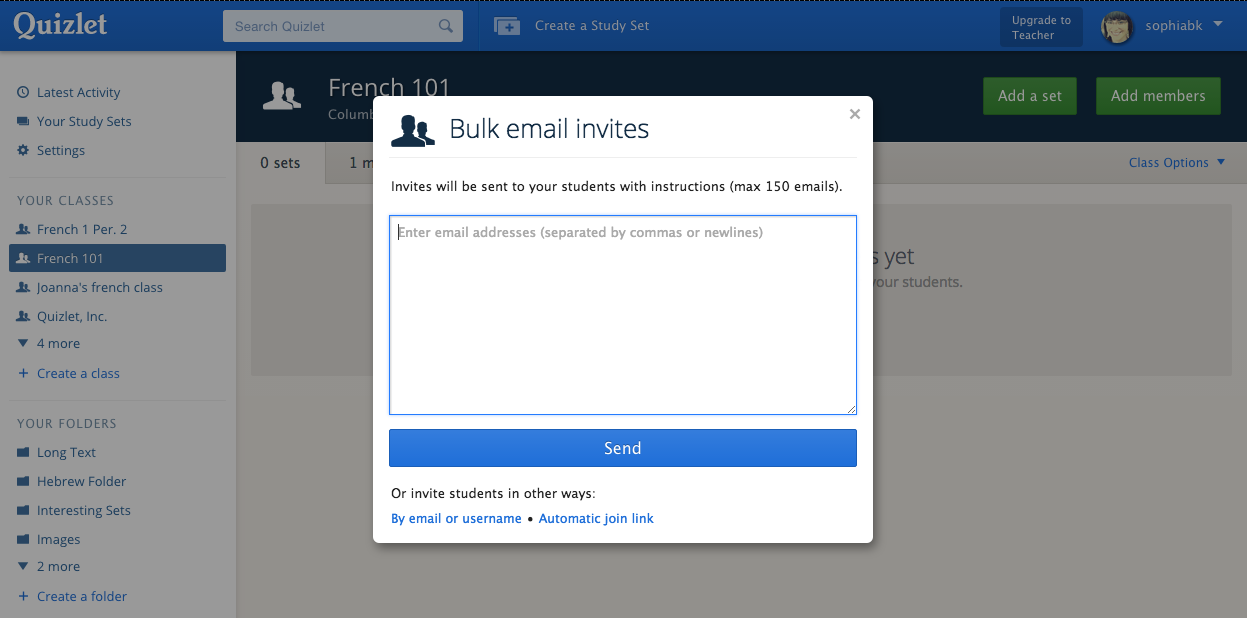
You can invite all of your students to your Quizlet classes at once (up to 150 at a time), and Quizlet will send an email invite to each student. Students can sign up for a free Quizlet account or log into their existing account to accept the invite and join your class. Learn more about how to add students to your classes.
Google Classroom & Quizlet Integrations
Are you a teacher who uses Google Classroom? Google Classroom courses can now become Quizlet Classes in just a few clicks.
Quizlet Class Integration


Connect your Classroom account to Quizlet, select the courses you'd like to add to Quizlet, and we'll invite all of your students to sign up or log in and join your class. Learn more here.
Share to Google Classroom
You can also post a Quizlet study set directly to your Google Classroom course.

Click on the "Share on Google Classroom" button from any of your Quizlet sets, and students will see the link in their course stream.

Improved Image Uploading
This is a Quizlet Teacher feature.
Images can make studying much more engaging for students, and now we've made it even faster and easier to add images to study sets.

Select as many images from your computer as you need and drag them onto the page while you're creating a study set. Learn more about uploading your own images.
Improved Class Progress
This is a Quizlet Teacher feature.
Class Progress shows you how your students are doing on Quizlet. Our latest updates streamline Class Progress and make it more informative.

Click on the "Class Progress" tab on any set you've created to see how and when your students have studied.
If your students are in a Quizlet class, you can also see which study modes they've used and their best scores for Test, Scatter, and Space Race. Learn more.

Quizlet Teachers also have an additional "students" sorting option on the terms list. It shows which terms your students are struggling with most by displaying students' aggregate performance on individual terms.

Subscribe to:
Posts (Atom)