Welcome back to Quizlet, Teachers!
News · Posted by Sophia yesterday

It's a new school year and we're launching a bunch of new features to make Quizlet even more powerful for teachers. Check them out and let us know what you think!
Quick and Easy Class Setup
Getting all of your students into a class on Quizlet has always been a major pain point. Our new Bulk Email Invite option aims to fix that in time for school this year.
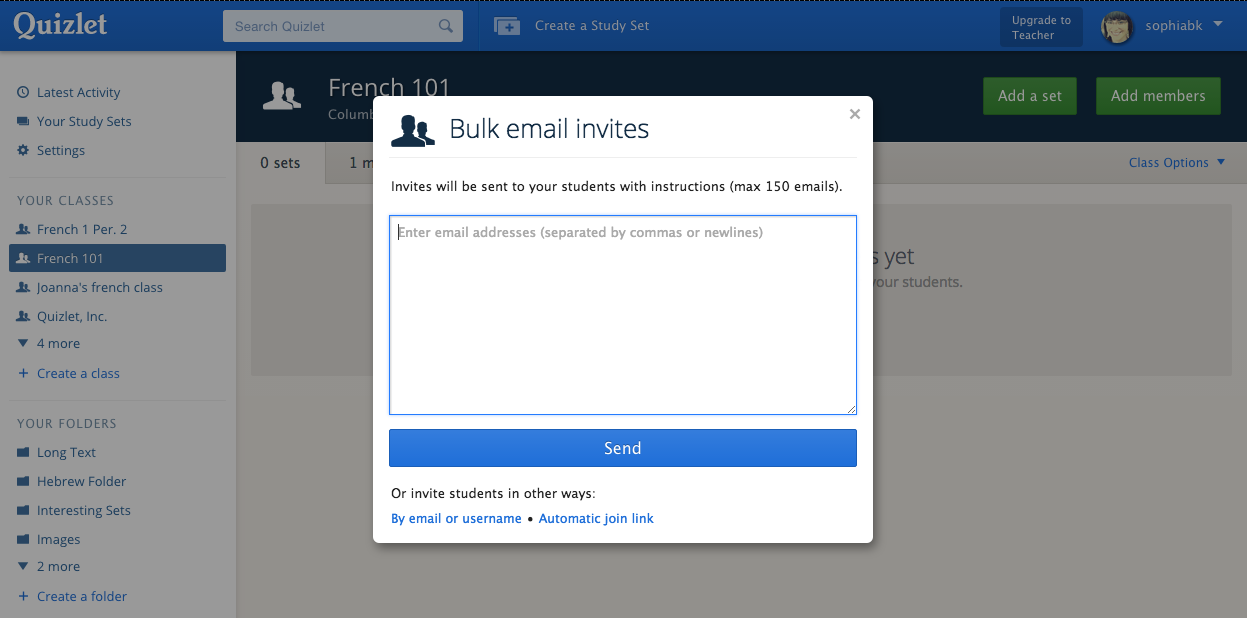
You can invite all of your students to your Quizlet classes at once (up to 150 at a time), and Quizlet will send an email invite to each student. Students can sign up for a free Quizlet account or log into their existing account to accept the invite and join your class. Learn more about how to add students to your classes.
Google Classroom & Quizlet Integrations
Are you a teacher who uses Google Classroom? Google Classroom courses can now become Quizlet Classes in just a few clicks.
Quizlet Class Integration


Connect your Classroom account to Quizlet, select the courses you'd like to add to Quizlet, and we'll invite all of your students to sign up or log in and join your class. Learn more here.
Share to Google Classroom
You can also post a Quizlet study set directly to your Google Classroom course.

Click on the "Share on Google Classroom" button from any of your Quizlet sets, and students will see the link in their course stream.

Improved Image Uploading
This is a Quizlet Teacher feature.
Images can make studying much more engaging for students, and now we've made it even faster and easier to add images to study sets.

Select as many images from your computer as you need and drag them onto the page while you're creating a study set. Learn more about uploading your own images.
Improved Class Progress
This is a Quizlet Teacher feature.
Class Progress shows you how your students are doing on Quizlet. Our latest updates streamline Class Progress and make it more informative.

Click on the "Class Progress" tab on any set you've created to see how and when your students have studied.
If your students are in a Quizlet class, you can also see which study modes they've used and their best scores for Test, Scatter, and Space Race. Learn more.

Quizlet Teachers also have an additional "students" sorting option on the terms list. It shows which terms your students are struggling with most by displaying students' aggregate performance on individual terms.


No comments:
Post a Comment